Blog
Role Based Access Control in Education ERP | EduSys
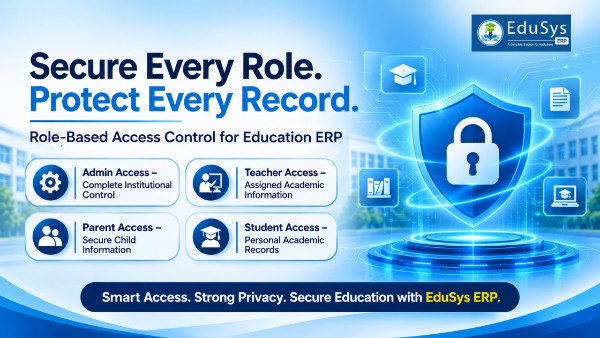
Role-Based Access Control: How Education ERP Protects Student Data and Institutional Information
Educational institutions manage a large amount of sensitive information every day. From student admission details and academic records to staff information, attendance, examination results, and fee transactions, every department handles important institutional data.
However, not every person working within an institution needs access to all this information. Teachers need student academic details, parents need information about their children, students need access to their own academic records, and administrators need broader control over institutional activities.
This is where Role Based Access Control (RBAC) becomes important. It helps educational institutions organize user permissions according to individual responsibilities, restrict unauthorized access, and maintain better control over confidential information.
With modern Education ERP solutions like EduSys ERP, institutions can manage multiple user roles through a centralized digital platform while supporting more organized and secure administrative operations.
What Is Role Based Access Control (RBAC)?
Role Based Access Control is a security approach that determines what information and system functions a user can access based on their assigned role within an organization.
Instead of providing every user with the same permissions, the system assigns specific access rights according to their responsibilities.
For example, a school administrator may have permission to manage admissions, fees, student records, and staff information. A teacher may access assigned classes, attendance, homework, and academic records. Parents can view their children's information, while students can access their own academic details.
The main objective is to ensure that users can access the information required for their work without exposing unnecessary or confidential institutional records.
For a better understanding of access management principles, refer to the NIST Role Based Access Control (RBAC) model, which explains how organizations can manage user permissions based on assigned roles and responsibilities.
Why Is Access Control Important for Educational Institutions?
Pre-schools, Schools, colleges, universities, and coaching institutes manage information belonging to different stakeholders. Without proper access restrictions, sensitive information may become accessible to people who do not need it.
Here are some important reasons institutions should implement structured user permissions.
1. Protect Student Information
Student profiles contain personal information, contact details, academic performance, attendance, and other important records.
Access restrictions help ensure that only authorized individuals can view or manage relevant student information.
2. Maintain Staff and Faculty Privacy
Institutions also maintain confidential employee information, including personal details, attendance, salary records, and employment documents.
Providing appropriate permissions helps restrict access to these records.
3. Reduce Unauthorized Data Access
When users receive permissions according to their responsibilities, the possibility of unnecessary access to confidential information can be reduced.
4. Improve Administrative Control
Administrators can organize user responsibilities more effectively by assigning suitable access permissions to different departments and users.
5. Build Trust Among Parents and Students
Parents expect educational institutions to handle their children's information responsibly. Appropriate access restrictions help institutions demonstrate a commitment to data privacy.
How Does Role Based Access Control Work in Education ERP?
An Education ERP system connects multiple departments and stakeholders through a centralized platform. Access permissions help determine which modules and records each user can work with.
The process generally involves three important elements:
1. User Identification
Every individual receives an account to access the ERP system. The account identifies the person using the platform.
2. Role Assignment
The administrator assigns an appropriate role according to the user's responsibilities, such as administrator, teacher, parent, or student.
3. Permission Management
The system associates permissions with the assigned role. These permissions determine which records and functions the user can access.
For example, a teacher may be allowed to update attendance and enter examination marks but may not have permission to manage institutional salary records.
This approach makes information management more organized and reduces unnecessary access.
Different User Roles in an Education ERP System
An educational institution has several stakeholders, and each requires different levels of access.
1. Administrator Access
Administrators require broader access to manage institutional operations.
Their responsibilities may include:
• Managing student and staff information.
• Handling admissions and registrations.
• Monitoring attendance and academic activities.
• Managing fees and financial information.
• Generating institutional reports.
• Managing user accounts and permissions.
2. Teacher and Faculty Access
Teachers need access to information related to their assigned academic responsibilities.
Typical permissions include:
• Viewing assigned classes and student profiles.
• Recording student attendance.
• Managing homework and assignments.
• Updating examination marks.
• Monitoring student academic progress.
• Communicating with parents and students.
3. Parent Access
Parents need visibility into their children's educational activities without accessing other students' confidential information.
Their access may include:
• Viewing attendance records.
• Checking examination results.
• Monitoring homework and assignments.
• Checking fee details and payment status.
• Receiving school announcements and notifications.
• Communicating with teachers.
4. Student Access
Students require access to their personal academic information and learning activities.
Their permissions may include:
• Viewing personal academic profiles.
• Checking attendance records.
• Accessing examination schedules and results.
• Viewing homework and assignments.
• Checking timetables.
• Receiving academic notifications.
Key Benefits of Role-Based Permissions in Education ERP
Implementing structured access permissions provides several operational and security benefits.
Improved Data Privacy
Sensitive student, parent, and staff information can be restricted according to assigned permissions.
Better User Experience
Users can focus on the modules and information relevant to their responsibilities instead of navigating unnecessary administrative features.
Simplified User Management
Institutions can organize access according to departments, responsibilities, and user categories.
Reduced Administrative Complexity
A centralized ERP platform makes it easier to coordinate different user groups and their activities.
Better Institutional Accountability
Clearly defined roles help institutions establish responsibility for different administrative and academic activities.
How EduSys ERP Supports Role-Based User Management
Managing multiple stakeholders through separate applications can create unnecessary complexity for educational institutions.
EduSys ERP brings different institutional activities together through an integrated education management platform. It supports multiple user-role logins, allowing administrators, faculty, staff, parents, and students to access relevant platform functions.
EduSys also provides different management solutions for preschools, schools, colleges, universities, and coaching institutes.
Some relevant capabilities include:
Multiple User Login Types
EduSys College ERP supports five login types: Super Admin, Admin/IT Admin, Faculty/Staff, Parent, and Student. This helps institutions organize platform access according to user responsibilities.
Student Information Management
The Student Information System helps institutions maintain student profiles, admission details, attendance, examination information, and academic records.
Document Management
Institutions can manage important documents and protected information through centralized document management capabilities.
Academic and Classroom Management
Teachers and faculty can work with relevant classroom activities, assignments, timetables, attendance, and academic information.
Parent and Student Communication
Communication features such as SMS, email, chat, and notifications help institutions connect with parents, students, teachers, and staff.
Data Security
EduSys lists data security capabilities, including SSL encryption in its college ERP product information.
These features help educational institutions manage multiple user groups through one connected platform while supporting more organized information access.
Explore EduSys ERP to learn more about its education management solutions.
Best Practices for Managing User Access in Educational Institutions
Selecting an ERP platform is only one part of maintaining information security. Institutions should also follow appropriate access management practices.
1. Follow the Principle of Least Privilege
Give users only the permissions they need to complete their responsibilities. Avoid providing unnecessary administrative privileges.
2. Review User Permissions Regularly
Review access permissions whenever an employee changes departments, takes on new responsibilities, or leaves the institution.
3. Maintain Separate User Accounts
Avoid sharing administrator or staff login credentials. Individual accounts improve accountability and help identify user activities.
4. Remove Unnecessary Access
Disable accounts that are no longer required and remove outdated permissions to reduce potential security risks.
5. Educate Staff About Data Privacy
Train employees to use institutional systems responsibly, protect login credentials, and avoid sharing confidential information.
6. Monitor Access Activities
Where supported, review access logs and administrative activities to identify unusual access patterns and investigate potential issues.
How EduSys ERP Helps with Role-Based Access Control in Educational Institutions
Managing access to institutional information becomes increasingly important as educational organizations grow and involve more administrators, teachers, students, parents, and staff members.
EduSys ERP provides an integrated education management platform that supports different user login types and helps institutions organize their daily activities through a centralized system.
Whether you operate a preschool, school, college, university, or coaching institute, EduSys offers dedicated ERP solutions designed around the operational requirements of different educational organizations.
With EduSys ERP, institutions can benefit from:
• Multiple User Login Types: Separate login options for administrators, faculty, staff, parents, and students.
• Centralized Student Information: Maintain student profiles, admission details, attendance, and academic records.
• Academic Management: Organize classroom activities, examinations, assignments, and academic information.
• Parent Engagement: Keep parents informed through communication and notification features.
• Institutional Data Security: Support secure access to institutional information through platform security features, including SSL encryption.
By bringing different institutional activities together, EduSys ERP helps educational organizations improve administrative coordination and manage information more systematically.
Looking for an Education ERP that simplifies institutional management?
Explore EduSys ERP and discover solutions designed for modern educational institutions.
Frequently Asked Questions (FAQs)
1. What is Role Based Access Control in education ERP?
Role Based Access Control is a security approach that assigns system permissions according to a user's responsibilities. In education ERP, it helps administrators, teachers, parents, and students access relevant institutional information.
2. Why is RBAC important for schools and colleges?
RBAC helps schools and colleges protect confidential student and staff information, organize user responsibilities, reduce unnecessary data access, and improve administrative control.
3. What are the common user roles in an Education ERP system?
Common user roles include Super Admin, Administrator, Teacher, Faculty, Staff, Parent, and Student. Each role has different responsibilities and information requirements.
4. How does role-based access control protect student information?
It helps restrict access to student profiles, attendance, examination results, contact information, and other academic records according to authorized user responsibilities.
5. What is the difference between RBAC and traditional user access management?
Traditional access management may assign permissions individually to users. RBAC groups permissions according to predefined roles, making access administration more structured and easier to manage.
6. Can parents and students have separate access in an Education ERP?
Yes. An Education ERP can provide separate parent and student login accounts. Parents can access relevant information about their children, while students can view their own academic details.
7. How can educational institutions improve data security?
Institutions can improve data security by implementing role-based permissions, using individual login accounts, reviewing access rights regularly, training employees, and monitoring system activities.
8. Does EduSys ERP support multiple user login types?
Yes. EduSys ERP supports different login types for institutional users. Its College ERP includes Super Admin, Admin/IT Admin, Faculty/Staff, Parent, and Student login types, helping institutions organize access for different stakeholders.
 31 Oct 2026
Useful Links
Social media